N2IVR (VXML)
Introduction
This section describes a base/typical deployment of the N2IVR product with call control by VoiceXML.
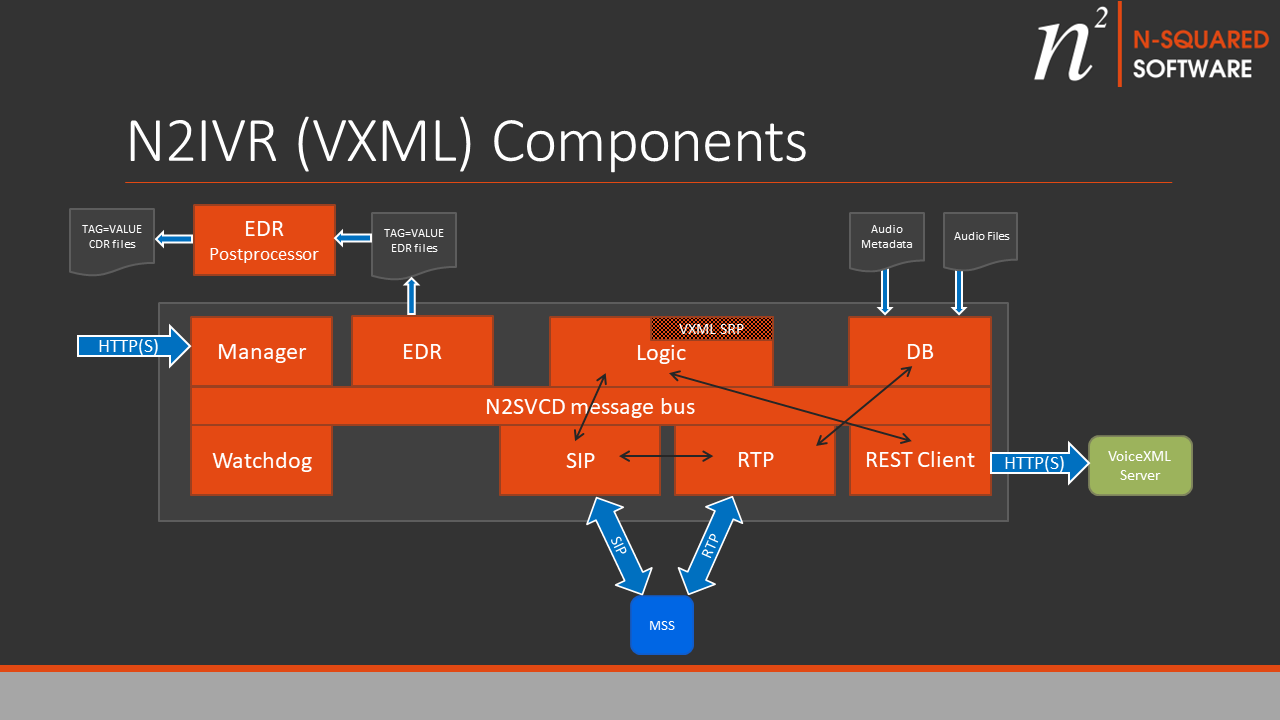
The solution specific applications which must be configured are:
- LhoSipApp (SIP in this diagram)
- LogicApp (Logic in this diagram)
- RtpApp (RTP in this diagram)
- RestClientApp (Rest Client in this diagram)
- DBApp (DB in this diagram)
The sub-component labelled “IVR” is the n2ivr_vxml.lua script which defines the service logic.
LhoSipApp
The LhoSipApp is responsible for accepting the inbound SIP INVITE request, and handing it off to
the LogicApp for call control.
You will need to review and configure the common SIP configuration parameters for this application as described in the Common SIP Configuration page. The default parameters should typically startup and function. Parameter settings are deployment-specific and cannot be generalised here.
In addition, for an IVR deployment of LhoSipApp set the additional parameters:
- Parameter
rtp_app_namemust refer to the name of yourRtpApp. - Parameter
default_logic_app_namemust refer to the name of yourLogicApp.
You can only have on LhoSipApp per SIP port number. I.e. you may not use the repeat attribute for this application unless you use multiple SIP ports.
The LhoSipApp will communicate with the LogicApp. At the start of the call control it sends the message SCC-HANDLE-ALEG-INBOUND-INVITE.
The LhoSipApp will communicate with the RtpApp. When the RTP channel is required it sends the message RTP-ESTABLISH.
LogicApp
Configure a LogicApp as described in the Logic App Configuration page.
Various IVR-specific configuration is required, including application parameters:
- The
default_lua_lib_pathmust include then2siplua lib path. - The
default_rest_app_nameshould be the name of theRestClientAppfor sending HTTP requests to the VoiceXML HTTP server to retrieve VoiceXML documents. - Additional
rest_app_name_<route>parameters defined for each possible host/port combination that will be seen in URLs encountered by the VXML service.
Example:
    <parameters>
        <parameter name="default_lua_lib_path" value="../lua/lib/?.lua;../lua/lib/3rdparty/?.lua;../../n2sip/lua/lib/?.lua"/>
        <parameter name="default_rest_app_name" value="VXML-REST-Client"/>
        <parameter name="rest_app_name_10_10_4_100_8080" value="RestClientApp_10_10_4_100_8080"/>
        ...
There are two RestClientApp references in this example. The first is used when when no host/port is specified in a URL, and the second is used when a URL explicitly states 10.10.4.100:8080 as the host & port as part of the URL.
The LhoSipApp::LhoSipOutcallLuaAgent and RestClientApp::VxmlLuaAgent agents must be
configured. The IVR uses the first to do outbound dialling at the end of a
VoiceXML interaction, and the second to communicate with the RestClientApp
application to retrieve VoiceXML documents.
Example:
    <agents>
      <agent module="LhoSipApp::LhoSipOutcallLuaAgent" libs="../../n2sip/apps/lho_sip/lib"/>
      <agent module="RestClientApp::VxmlLuaAgent" libs="../../n2sip/apps/rest_c/lib"/>
    </agents>
There must be an LhoSipIncallLuaService configured which handles the SIP incall sequence which begins when the LogicApp receives SCC-HANDLE-ALEG-INBOUND-INVITE:
    <service module="LhoSipApp::LhoSipIncallLuaService" libs="../../n2sip/apps/lho_sip/lib" script_dir="../../n2sip/lua/svc">
        <globals>
            <!-- global configuration for the VXML IVR service -->
        </globals>
        <triggers>
            <!-- Triggers for inbound calls to trigger the service n2ivr_vxml -->
            <trigger called_prefix="64" script_key="n2ivr_vxml"/>
        </triggers>
    </service>
This must have:
- At least one
triggerentry intriggerswhich points to then2ivr_vxmlscript containing the IVR control logic. - Any
<global>configuration for N2IVR VXML globasl configured to override VXML IVR service defaults.
For an example of a configured LhoSipIncallLuaService, see the application configuration page.
The LogicApp may have the “repeat” attribute configured to run multiple instances sharing system load.
The LogicApp will communicate with the LogicApp by responding to the SCC-HANDLE-ALEG-INBOUND-INVITE message and subsequently exchanging messages to control the RTP stream and the SIP call.
RtpApp
The RtpApp should be configured as as described in the RTP App Configuration page.
The RtpApp may have the “repeat” attribute configured to run multiple instances sharing system load, and this is typically required for deployments which
are expected to operate more than 100 channels. Refer to the RTP App Configuration page especially for information how RTP port assignment
functions when using the “repeat” attribute.
The RtpApp will communicate with the LhoSipApp by responding to the RTP-ESTABLISH message and processing RTP-PLAY/RTP-PLAYED messages.
The RtpApp will communicate with the DBApp by sending DB-REQUEST to fetch audio metadata and audio data from the database.
Note: The RtpApp can also be configured to operate from flat file configuration/audio without using the database.
DBApp
The DBApp should be configured as as described in the DB App Configuration page.
The DBApp may have the “repeat” attribute configured to run multiple instances sharing system load. It may be desirable to run more than one copy of the DBApp in order to reduce set-up latency.
The DBApp for RTP operates in DBI mode.
The DBApp responds to the DB-REQUEST messages received from the RtpApp and returns DB-RESPONSE messages.
RestClientApp
The RestClientApp should be configured as as described in the REST Client App Configuration page.
The RestClientApp may have the “repeat” attribute configured to run multiple
instances sharing system load. It may be desirable to run more than one copy
of the app in order to reduce single-CPU load.
It is also suggested that the number of concurrent client connections (num_client_connections)
is configured to be (in aggregate across the number of repeated app instances)
a number in excess of (number of calls per second * estimated max seconds for VoiceXML server to respond)
For example, if the VoiceXML server will take at most 3 seconds to respond (e.g. at the 99%-ile),
and the max requests is anticipated to be 50, then in aggregate the number of client connections
should be set to at least 150.
It is suggested that the server_timeout be set to at most the maximum anticipated
(and reasonable) time for a VoiceXML server response.
Matching URL Requests to RestClientApps
The VXML service configuration determines the initial VoiceXML server URL to connect to.
VXML documents received by VXML servers will also include URLs (in <submit> elements).
To send the HTTP request to the correct server, the VXML N2IVR service maps the host/port
for URLs with them defined to the correct RestClientApp using the rest_app_name_XXX routing
mechanism).
To configure the VXML N2IVR service, make sure the necessary configuration for each VXML server connection is in place:
- Configure a RestClientApp for each VXML Server that may be connected to:
        <application name="RestClientApp_10_10_4_100_8080" module="RestClientApp">
            <include><lib>../apps/rest_c/lib</lib></include>
            <parameters>
                <parameter name="trace_level"            value="0"/>
                <parameter name="remote_host"            value="10.10.4.100"/>
                <parameter name="remote_port"            value="8080"/>
                <parameter name="num_client_connections" value="25"/>
                <parameter name="server_timeout"         value="2"/>
            </parameters>
        </application>
This RestClientApp example is configured with the name RestClientApp_10_10_4_100_8080
The name of the RestClientApp may be any unique name, however naming it consistent with
the remote_host and remote_port, is suggested.
The RestClientApp will only connect to one hostname (or IP) (e.g. in this example 10.10.4.100 on port 8080), so each possible host to connect to must have it’s own RestClientApp defined.
- Configure REST routes for the N2IVR LogicApp:
<parameter name="rest_app_name_10_10_4_100_8080" value="RestClientApp_10_10_4_100_8080"/>
This rest_app_name route configuration inside the VXML N2IVR’s LogicApp <parameters>
list will map the RestClientApp to a host/port used in a URL from a VXML document.
The route must match the URL host & port when given. The rules for converting a host & port provided in a URL to a RestClientApp route are:
- Where no host/port is specified (e.g. in N2IVR configuration a relative path is used)
the default REST app is used, as configured using
default_rest_app_name. This may be configured as a<virtual>app and round-robin requests across all VXML Server hosts configured. - Where a host/port is specified the REST app route is determined by replacing dots (
.) with underscores (_) and appending the port in the format:hostname_port. - A port is always appended even if not explicitly listed. e.g. http://myserver.telco/path/to/doc
would look up a route
myserver_telco_80. This avoids requiring two routes configured, one with an explicit default port, and one without. - If a URL is only a relative path, but the VXML document has otherwise specified in some
form (e.g. by using the
xml:baseattribute), then the base URL’s host & port are used.